

The marketplace and shops
Browse products and shops, write to the seller in your language.
The marketplace is the LibComPlus tab where merchants present their products in a shop window. You write to them in your language, they reply in theirs, and translation happens between you.
Browse
Open Explore, then the Marketplace tab.
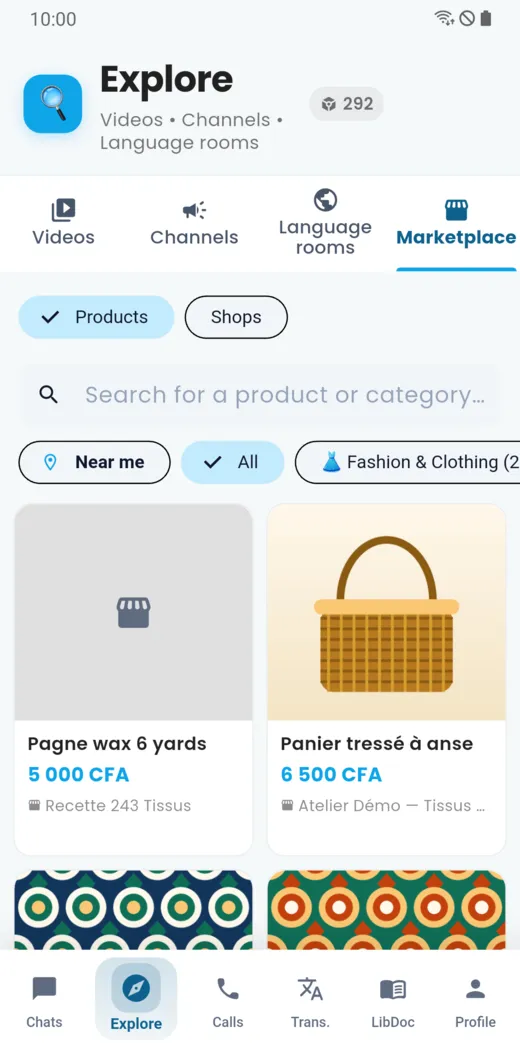
- Products lists the items; Shops lists the shops.
- The Near me filter highlights what is close to you.
- Categories (for example “Fashion and clothing”) narrow the list.
- Each product shows its price and the name of the shop.
View a product
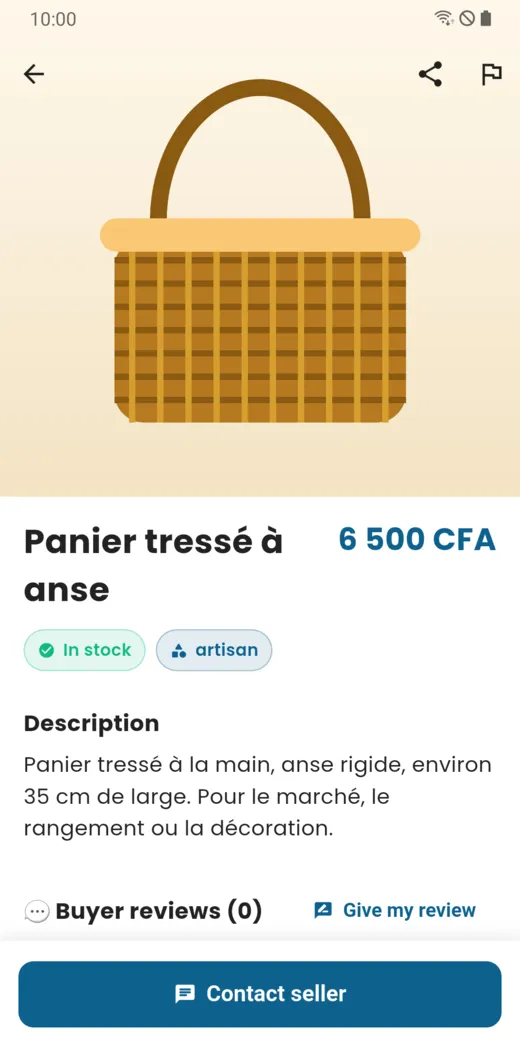
Tap a product to open its page: price, availability (“In stock”), description and buyer reviews. You can share it, or report the product if there is a problem.
Write to the seller
On the product page, tap Contact seller: a conversation opens, like with any other contact. You write in your language, the seller reads in theirs. At the top of the conversation, a banner shows the shop, with the Catalogue and Contact the seller buttons.
Paying
Payment for a purchase is settled directly between you and the seller. LibComPlus puts you in touch; it does not collect the price of the products.
Are you a merchant?
A shop is presented with a catalogue, opening hours and a contact. It is managed from the app.
Doesn’t this page answer your question?
Ask it in the help window, or write to support@libcomplus.com.
Ask a question